
Ask workspace documents from your app
Your policies, manuals, circulars and price lists already sit in ZenithAI workspaces, where
people ask about them in chat. POST /workspace brings the same answers to your own software: the intranet,
a help desk, a branch app, a bot in your team chat, a script that checks contracts every night.
You send a question. ZenithAI finds the answer in the workspace’s documents, on your own server, and sends
back the answer, the documents it came from, and a found flag that is false when the documents don’t say.
There is no index to build, no embeddings to store and no retrieval code to write.
Before you start
Section titled “Before you start”- Put the documents in a workspace, or use one you already have. See Workspaces.
- Create an API key on the API keys page. See API keys. The key answers as you: it can ask every workspace you can open, and nothing else.
- Keep the key in an environment variable,
API_KEY, on the machine that runs your code.
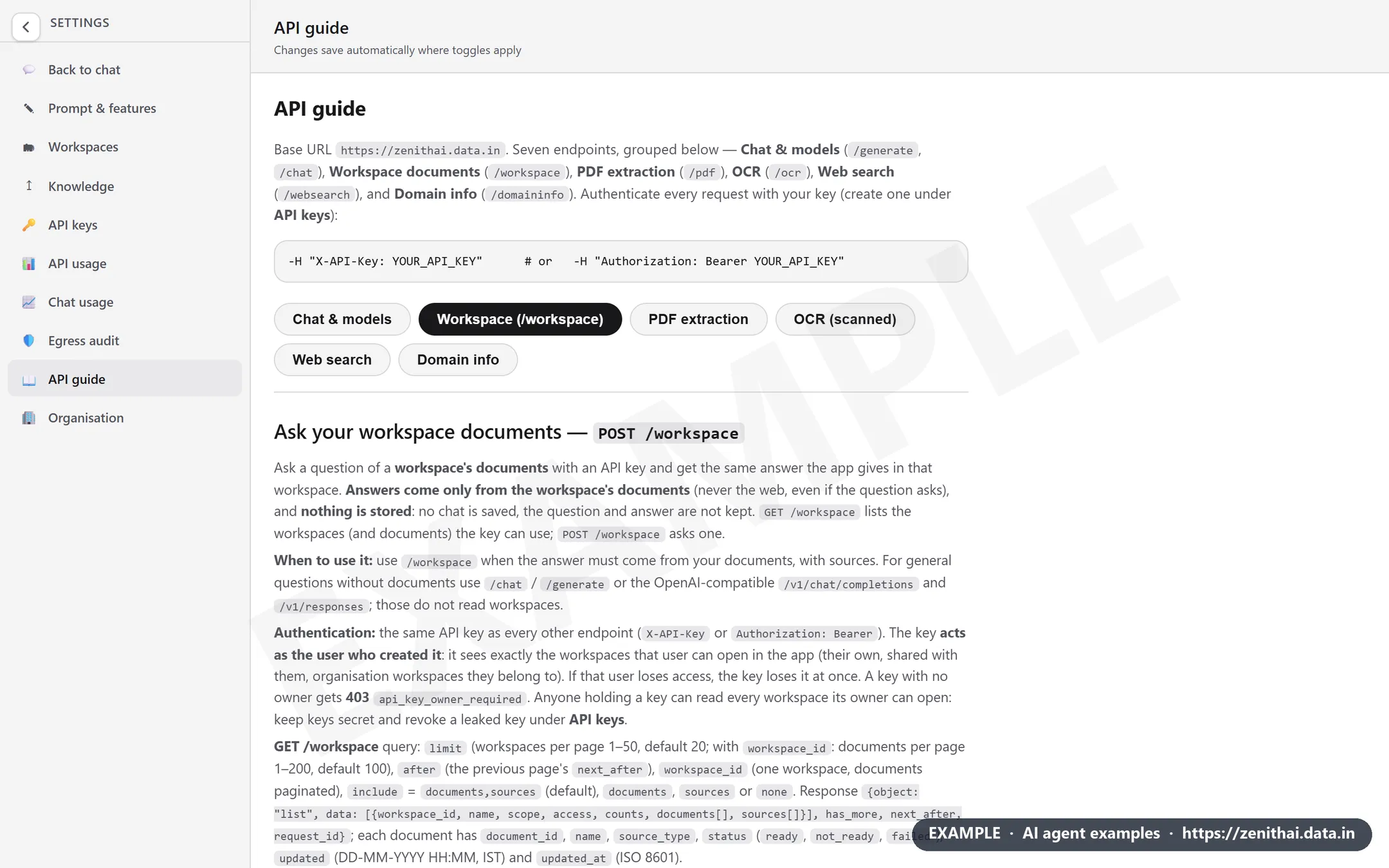
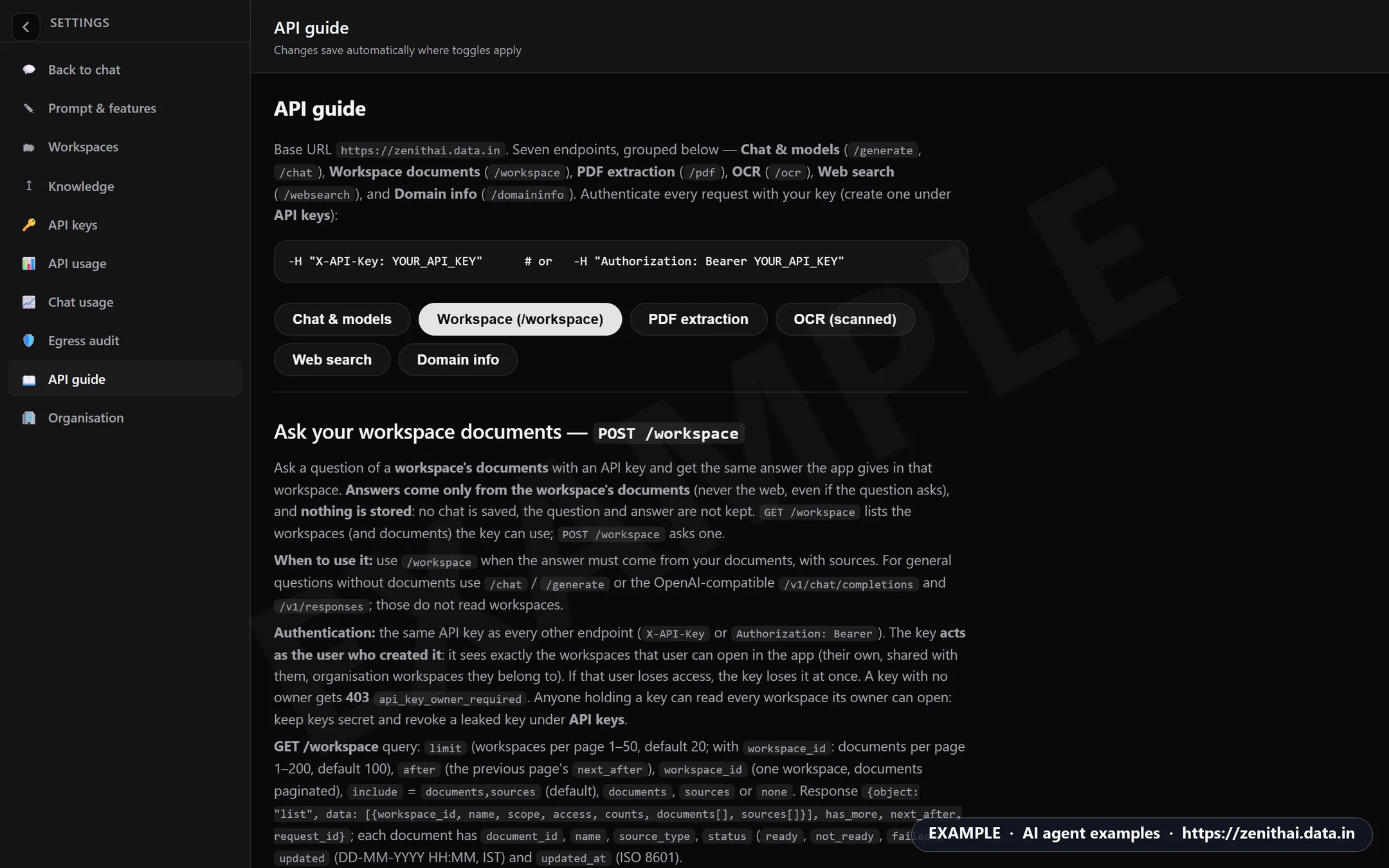
Inside ZenithAI, Settings › API guide has a Workspace tab that sums up this endpoint, with your server’s base URL.
1. Find the workspace
Section titled “1. Find the workspace”GET /workspace lists the workspaces your key can use, with their documents.
import os, requests
H = {"Authorization": "Bearer " + os.environ["API_KEY"]}r = requests.get("https://dummydomain/workspace", headers=H, timeout=60)r.raise_for_status()for ws in r.json()["data"]: print(ws["workspace_id"], ws["scope"], ws["counts"]["ready"], "ready |", ws["name"])curl --fail-with-body -s "https://dummydomain/workspace?include=none" \ -H "Authorization: Bearer $API_KEY"Copy the workspace_id of the workspace you want. Organisation workspaces start with org_. The examples
below read it from an environment variable, WORKSPACE_ID.
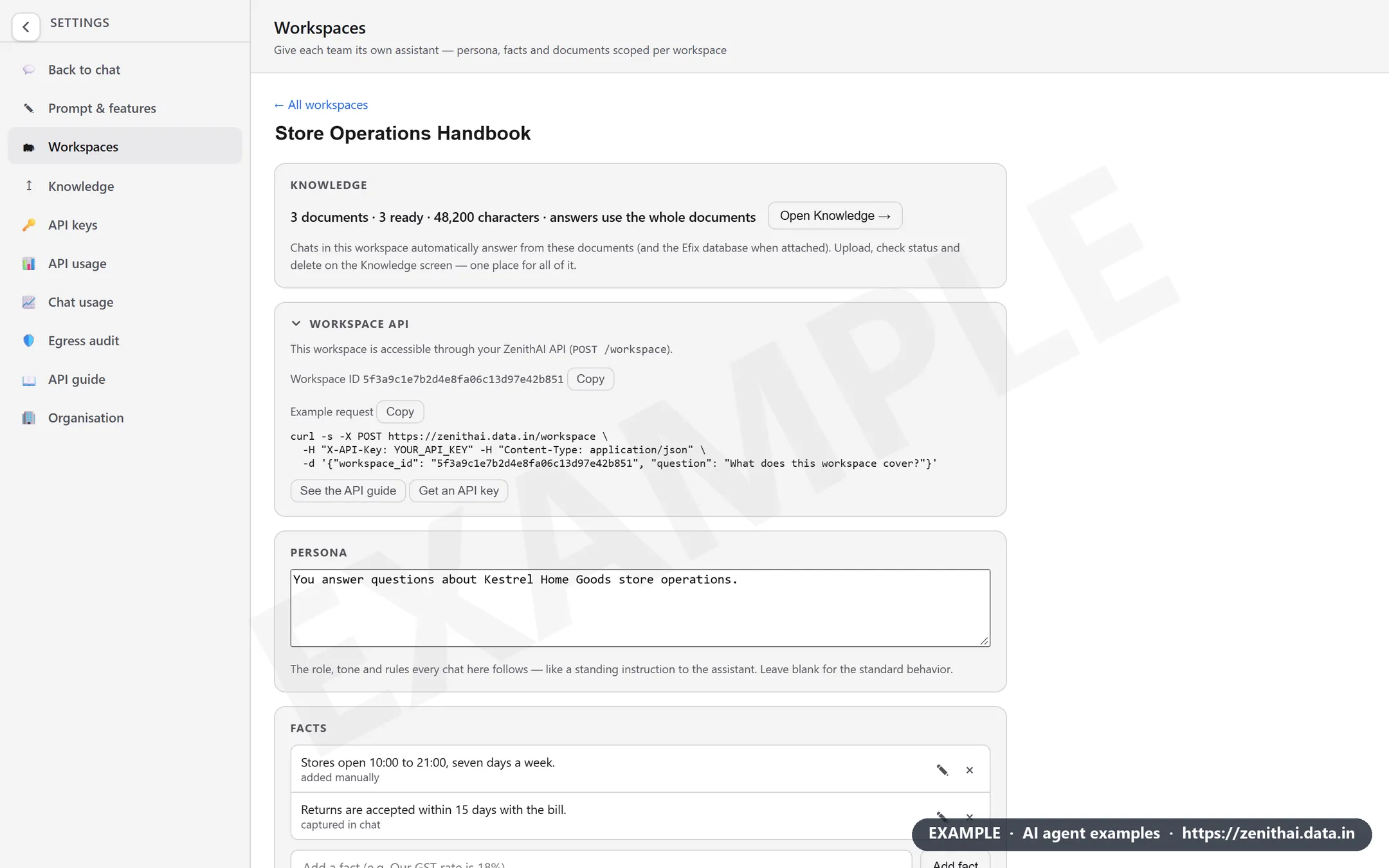
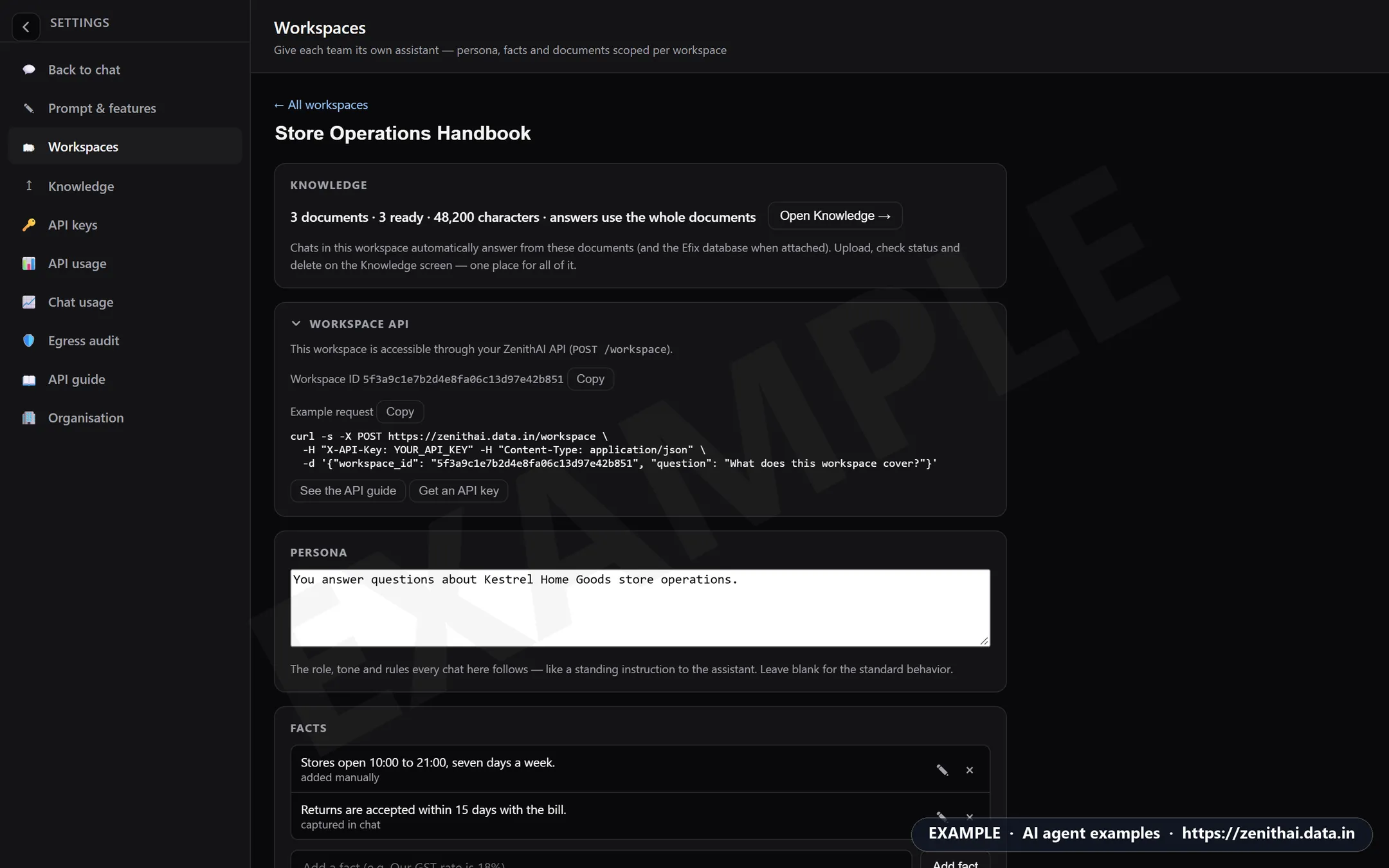
You can also find it in the app. Open the workspace in Settings › Workspaces: the Workspace API card, after Knowledge, shows the Workspace ID with a Copy button, an Example request with this workspace already filled in, and See the API guide and Get an API key. The card appears when the API guide is on for your server.
2. Ask a question
Section titled “2. Ask a question”import os, requests
H = {"Authorization": "Bearer " + os.environ["API_KEY"]}r = requests.post("https://dummydomain/workspace", headers=H, timeout=200, json={ "workspace_id": os.environ["WORKSPACE_ID"], "question": "How many days of annual leave do permanent employees get?",})r.raise_for_status()a = r.json()if a["found"]: print(a["answer"]) print("Sources:", ", ".join(s["name"] for s in a["sources"]))else: print("Not in the documents:", a["answer"])const res = await fetch("https://dummydomain/workspace", { method: "POST", headers: { Authorization: `Bearer ${process.env.API_KEY}`, "Content-Type": "application/json" }, body: JSON.stringify({ workspace_id: process.env.WORKSPACE_ID, question: "How many days of annual leave do permanent employees get?", }),});const a = await res.json();if (!res.ok) throw new Error(a.code);console.log(a.found ? a.answer : "Not in the documents.");curl --fail-with-body -s "https://dummydomain/workspace" \ -H "Authorization: Bearer $API_KEY" -H "Content-Type: application/json" \ -d "{\"workspace_id\": \"$WORKSPACE_ID\", \"question\": \"How many days of annual leave do permanent employees get?\"}"A typical answer, shortened:
{ "object": "workspace.answer", "model": "fast", "status": "completed", "found": true, "answer": "Permanent employees get **24 days** of annual leave per calendar year (Leave Policy.pdf).", "sources": [{"index": 1, "name": "Leave Policy.pdf", "source_type": "file", "used": false}, {"index": 2, "name": "Monthly sales.csv", "source_type": "file", "used": false}], "coverage": {"mode": "whole", "documents_selected": 2, "documents_checked": 2, "documents_used": null}}Every field is described in the API reference.
3. Trust the answer, or don’t
Section titled “3. Trust the answer, or don’t”Three fields tell your program how far to trust an answer.
found.falsemeans the documents don’t cover the question. The answer then says so and names the documents it checked, andsourcesis empty. Show your own message, offer a person to talk to, or log the gap so someone adds the missing document. Never present afound: falseanswer as a fact.sources. The documents behind the answer. When the whole workspace is asked, every document is given to the model, so the server can’t say which one the answer came from, and they all sayused: false. Ask one document (next section) and its source saysused: true.status.incompletemeans the answer was cut off at the length limit. Ask for a shorter answer, raisemax_output_tokens, or use streaming.
4. Ask one document
Section titled “4. Ask one document”When you know which document holds the answer, send its id. The answer is faster, uses fewer tokens and its
source is exact. Document ids come from GET /workspace?workspace_id=....
import os, requests
H = {"Authorization": "Bearer " + os.environ["API_KEY"]}a = requests.post("https://dummydomain/workspace", headers=H, timeout=200, json={    "workspace_id": os.environ["WORKSPACE_ID"],    "knowledge": {"document_ids": [os.environ["DOCUMENT_ID"]]},    "question": "How many days of unused annual leave can be carried forward?",}).json()print(a["found"], a["answer"])print([(s["name"], s["used"]) for s in a["sources"]])
Asking several chosen documents at once is planned for a later release. Today it is the whole workspace or one document.
Ask about numbers in a spreadsheet
Section titled “Ask about numbers in a spreadsheet”A CSV or Excel file in the workspace can answer questions such as totals and averages. ZenithAI calculates the
result rather than reading it from text, and coverage.mode is compute.
import os, requests
H = {"Authorization": "Bearer " + os.environ["API_KEY"]}a = requests.post("https://dummydomain/workspace", headers=H, timeout=200, json={    "workspace_id": os.environ["WORKSPACE_ID"],    "question": "What were total sales from January to April?",}).json()print(a["coverage"]["mode"], "|", a["answer"])
Follow-up questions
Section titled “Follow-up questions”The server keeps no conversation, and stores neither the question nor the answer. Your program keeps the
turns and sends them back in history, ending with the assistant’s last answer.
import os, requests
H = {"Authorization": "Bearer " + os.environ["API_KEY"]}URL, WS = "https://dummydomain/workspace", os.environ["WORKSPACE_ID"]history = []
for question in ["How many days of annual leave do permanent employees get?", "And how many sick days?"]:    a = requests.post(URL, headers=H, timeout=200,                      json={"workspace_id": WS, "question": question, "history": history}).json()    print("Q:", question, "\nA:", a["answer"], "\n")    history += [{"role": "user", "content": question}, {"role": "assistant", "content": a["answer"]}]    history = history[-20:]   # at most 20 turns
5. Stream long answers
Section titled “5. Stream long answers”Summaries and questions across many documents can take a while. With "stream": true you get progress and the
text as it is written, and the 180-second limit for a single answer doesn’t apply.
import json, os, requests
H = {"Authorization": "Bearer " + os.environ["API_KEY"]}body = {"workspace_id": os.environ["WORKSPACE_ID"], "question": "Summarise the leave policy in three lines.",        "stream": True}final, event = None, Nonewith requests.post("https://dummydomain/workspace", headers=H, json=body, stream=True, timeout=900) as r:    r.raise_for_status()    for line in r.iter_lines(decode_unicode=True):        if line.startswith("event: "):            event = line[7:]        elif line.startswith("data: "):            data = json.loads(line[6:])            if event == "answer.delta":                print(data["delta"], end="", flush=True)            elif event == "answer.reset":                print("\n[the text above was corrected]")            elif event == "answer.completed":                final = data          # the final answer: found, sources, usage            elif event == "answer.failed":                raise RuntimeError(data["error"]["code"])print("\nfound:", final["found"])
Treat the deltas as a preview. answer.completed carries the final answer, the same object as a non-stream
call. All events are listed in the reference.
Plain text for simple integrations
Section titled “Plain text for simple integrations”"format": "text" returns only the answer, which suits a chat bot or a shell script. found and the model
come in the X-Zenith-Found and X-Zenith-Model headers.
curl --fail-with-body -s -D headers.txt "https://dummydomain/workspace" \ -H "Authorization: Bearer $API_KEY" -H "Content-Type: application/json" \ -d "{\"workspace_id\": \"$WORKSPACE_ID\", \"question\": \"How many sick days do employees get?\", \"format\": \"text\"}"grep -i "x-zenith-found" headers.txtAdd documents from your app
Section titled “Add documents from your app”Your software can also keep a workspace up to date: add a new circular, policy or contract the moment it is
approved, then ask it. POST /workspace/documents adds one .txt, .pdf, .docx, .xlsx or .csv file to one
of your own personal workspaces. It needs two things from your administrator: adding documents switched on for
the server, and Can add documents ticked for your key. Without them you get 404 api_disabled or
403 key_not_allowed.
The pattern is always the same: choose a 12-character client_document_id, send the file as base64, then ask for
the status with that id until it is ready, and keep the server document_id for your questions.
import base64, os, random, string, timefrom pathlib import Pathimport requests
BASE = "https://dummydomain"H = {"Authorization": "Bearer " + os.environ["API_KEY"]}WS = os.environ["WORKSPACE_ID"]path = Path("Leave Policy.pdf")
# 1. choose your id first, and keep it: it finds the upload again after a time-outcid = "".join(random.choices(string.ascii_letters + string.digits, k=12))print("client_document_id:", cid)
# 2. send the file as one line of base64 (a scanned PDF can take minutes: 300 s time-out)body = {"workspace_id": WS, "client_document_id": cid, "name": path.name,        "data": base64.b64encode(path.read_bytes()).decode("ascii")}try:    r = requests.post(BASE + "/workspace/documents", headers=H, json=body, timeout=300)    if r.status_code not in (200, 202):        print(r.status_code, r.json()["code"])        raise SystemExit(1)except requests.Timeout:    print("Timed out: asking for the status, not sending again")
# 3. ask for the status until it is ready or failedfor _ in range(150):    s = requests.get(f"{BASE}/workspace/documents/{cid}", headers=H,                     params={"workspace_id": WS}, timeout=60).json()    if s.get("status") in ("ready", "failed") or "code" in s:        break    time.sleep(4)print(s.get("status"), s.get("document_id"), s.get("warnings"))
# 4. ask the new document with the server document_idif s.get("status") == "ready":    a = requests.post(BASE + "/workspace", headers=H, timeout=200, json={        "workspace_id": WS, "knowledge": {"document_ids": [s["document_id"]]},        "question": "How many days of annual leave do permanent employees get?"}).json()    print(a["answer"] if a.get("found") else "Not in the document.")
If the upload times out, don’t send the file again: ask for the status with the same client_document_id, as
step 3 does. A resend while the first upload is still running gets 429 too_many_uploads; once it has finished,
the same id and file return 200 with the current status and never make a second copy.
Ready-made PowerShell and bash blocks, every status and error code, the limits object and the upload warnings
are in the API reference: Add a document.
| Where the file comes from | What your program does |
|---|---|
| A document management system | Every evening, adds the circulars approved that day, so staff can ask them the next morning |
| An HR portal | When a policy is published, adds it to the HR workspace that the intranet asks |
| A contract intake form | Adds the signed contract, waits for ready, then asks it one question: the notice period, the renewal date |
| A reporting job | Adds the month’s sales CSV, so questions such as totals by region are calculated from the file |
What teams build with it
Section titled “What teams build with it”| Where the question comes from | What it asks | Workspace |
|---|---|---|
| Intranet search box | “What is the hotel limit for a manager in a metro city?” | HR and travel policies |
| Help desk, before an agent replies | “What is the warranty on the 1.5 tonne model?” | Product manuals and warranty terms |
| Branch staff app | “Which documents are needed to open a current account for a partnership firm?” | Circulars and process notes |
| Sales tool | “Which plans include on-site support?” | Price lists and plan sheets |
| A nightly job | “Does this contract allow termination without notice?” | One contract, asked with knowledge.document_ids |
| Team chat bot | Any question, answered in plain text with format: "text" |
An organisation workspace |
For each one, decide in advance what happens when found is false. That gap list is also your to-do list
for the next documents to add.
Good practice
Section titled “Good practice”- Check
foundbefore you show, store or act on an answer. - Give the integration its own account with access to only the workspaces it needs, and create the key there. Anyone holding the key can read everything its owner can open.
- Keep keys on the server. Never put them in browser or mobile app code. Call
/workspacefrom your back end and pass the answer on. - Keep workspaces current. Answers come from the documents in the workspace, so remove superseded versions when a new one is added.
- Retry only when
retryableistrue, waitingRetry-Afterseconds when it is given. See errors. - Use
metadatato tag requests with your own ids. It comes back unchanged and is never logged.
- API reference: Workspace for every field, event, error and limit.
- Workspaces to create workspaces and add documents.
- OpenAI-compatible chat for general questions that don’t need your documents.
Common questions
How do I ask questions of my company documents from my own application?
Put the documents in a ZenithAI workspace, create an API key, call GET /workspace to find the workspace id, then POST /workspace with that id and a question. The answer comes only from those documents, with the source documents listed and a found flag.
Can ZenithAI answer only from my documents and say when it doesn't know?
Yes. POST /workspace never searches the web. When the documents do not cover the question it returns found false, says the answer is not in the documents and names the documents it checked, instead of guessing.
Does the workspace API respect who can see which documents?
Yes. A key answers as the person who created it and sees only the workspaces that person can open in the app. If their access is removed, the key loses it at once. Create integration keys from an account with only the access the integration needs.
Is /workspace a RAG API?
It does the job of a retrieval-augmented generation API without the plumbing. ZenithAI prepares, indexes and searches the documents and writes the answer on your own server. Your program sends a question and gets back an answer, sources and coverage.
Can my application add documents to a ZenithAI workspace?
Yes, when your administrator has switched it on and ticked Can add documents for your key. POST /workspace/documents adds a txt, pdf, docx, xlsx or csv file to one of your own personal workspaces. Ask for its status with your client_document_id until it is ready, then ask it with the server document_id.
Can I ask a spreadsheet a question through /workspace?
Yes. For questions such as a total or an average over a CSV or Excel file in the workspace, ZenithAI calculates the result instead of reading it from text, and coverage.mode is compute.